暂无与当前版本匹配的更新说明。

No release notes match this app version.

1.8.0

新功能

AI 与语音助手

  • 键盘可切换到 AI:对着麦克风提问,回答会在键盘中实时出现,方便查看后再写入
  • 在即时通信等输入框中,先点白色「插入」,再点绿色「发送」;只有真正插入的内容会进入历史与字数统计
  • AI 空闲时会轮播常用提问和热点建议,点一下即可生成回答;需要天气、新闻等最新资料时会联网查找,失败会自动换方式重试
  • 设置 → AI Agent 可调节「回复篇幅」:简短 / 中等 / 详细
  • 刚输入过内容时,长按麦克风说出修改要求,可预览后替换原文或追加新内容
  • 润色会保留原本的提问语气,不再把「你能听到吗」等问句改写成回答

剪贴板与技能

  • 在设置 → 剪贴板开启「历史记录」(默认关闭),可在本机保存最近 15 条纯文本;页面也可直接前往系统设置,将「从其他 App 粘贴」设为允许
  • 键盘顶栏的剪贴板按钮可打开历史,点一条即可插入;开启「建议条」后,最新复制内容会显示在键盘上方
  • 复制文字后约 30 秒内切到 AI,可直接选择回复、总结或翻译;也可以说出「回复剪贴板」或「翻译剪贴板」
  • App 新增技能页,可管理最多 8 个键盘技能,并通过长按拖动调整顺序
  • 右上角 + 可自定义技能名称、图标和提示词,也可连接自己的 iCloud 快捷指令
  • 内置技能可从复制内容提取待办、写入日历、存入备忘录,或识别地址后打开高德、百度与 Apple 地图导航

全新 App 界面

  • 首页改为信息总览:使用统计、听写历史和个性词库集中显示为资料卡,点按后使用标准返回按钮进入完整列表
  • iPhone 底部导航重做为 首页 / 技能 / 风格 / 设置四栏 Liquid Glass Dock,绿色胶囊清楚标示当前页面
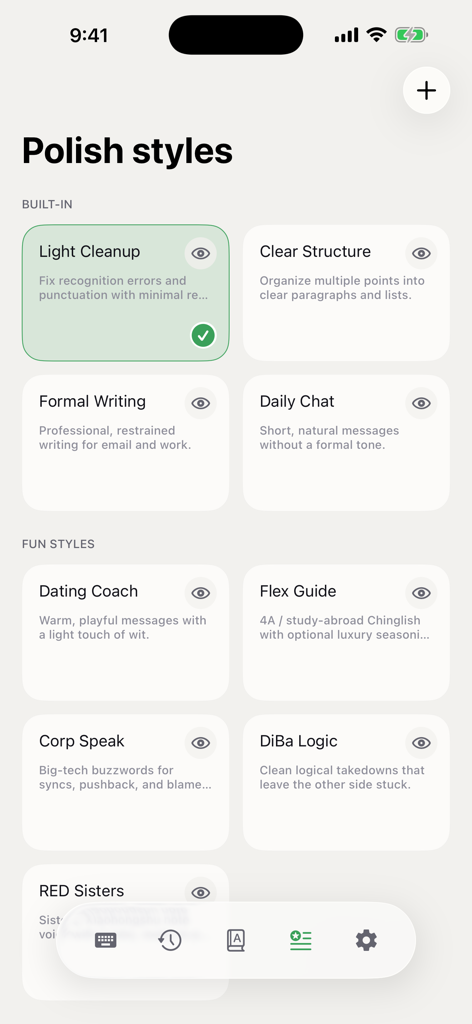
  • 技能与润色风格统一为卡片式管理:点按选择、右上角编辑、右下角显示启用状态;技能支持像主屏幕图标一样长按拖动排序
  • 设置入口重新整理,AI Agent、剪贴板、语音与文字输入等页面更容易找到,当前设置摘要直接显示在导航行右侧
  • iPad 改为侧栏 + 内容区布局,增大导航触控区域并统一图标对齐;翻译移到麦克风旁与撤销对称,顶栏原位置改为剪贴板入口

中英文输入全面升级

  • 英文键盘新增类 QuickType 候选栏,同时显示原词、纠错和补全;约 4 万词离线词表会结合系统词库、通讯录名称与文本替换提供建议
  • 英文邻键纠错更贴合真实键盘位置,并减少对专名、短词和全大写词的误改;拒绝纠错后会学习保留原词
  • 拼音优化 wom 等混合简拼排序,并支持 zhchsh 两键简拼;中文候选频率和英文选择偏好会保存在本机
  • 支持叠指连打、英文双空格句号,以及根据输入框显示前往、搜索、发送、完成、下一项等回车键文案
  • iPad 键盘横竖屏均铺满可用宽度,底行加入逗号、句号和系统地球键,并提供撤销、重做、复制和剪切

更稳定、更可控

  • 听写、AI 回答、编辑结果和剪贴板粘贴现在都可通过同一个撤销键一次回滚
  • 长按麦克风现在用于编辑上次输入;旧的长按剪贴板语音流程已由剪贴板历史和快捷技能替代
  • 中文输入资源会在 App 中自动完成初始化,部署完成后已打开的键盘也会自行恢复,无需反复重启
  • 修复跨设备剪贴板导致键盘卡住、切换键盘崩溃、录音取消不及时,以及 AI 会话结束后麦克风不可用等问题
  • 默认继续使用设备端语音识别;AI 使用你自己的 API Key,未配置时首页和麦克风上方会提示;剪贴板默认关闭,内容只在你主动操作后交给所配置的服务商

New Features

AI and voice assistant

  • Switch the keyboard to AI, ask with the microphone, and watch the answer appear on the keyboard before writing it into the current app
  • In messaging fields, tap white Insert, then green Send; only inserted answers count toward history and character statistics
  • Idle AI rotates useful prompts and current topics that can be sent with one tap; questions that need weather, news, or other current information use web search with automatic fallback
  • In Settings → AI Agent, choose Response length: Short / Medium / Detailed
  • Right after entering text, hold the microphone, describe the change, then preview and replace the original or append the result
  • Polish preserves your original question instead of rewriting prompts such as “Can you hear me?” into answers

Clipboard and Skills

  • Turn on History in Settings → Clipboard (off by default) to keep the latest 15 plain-text copies on this device; the same page opens system Settings for Paste from Other Apps permission
  • Open history from the keyboard's top-bar Clipboard button and tap an item to insert it; the optional Suggestion strip keeps the newest copy above the keyboard
  • Within about 30 seconds of copying text, switch to AI and choose Reply, Summarize, or Translate, or say “reply to the clipboard” or “translate my clipboard”
  • The new Skills page manages up to eight keyboard skills and reorders them with a long-press drag
  • Use the top-right + to create a skill with your own name, icon, and prompt, with an optional iCloud Shortcut connection
  • Built-in skills can extract to-dos, add calendar events, save to Notes, or recognize an address and open Amap, Baidu Maps, or Apple Maps

A New App Interface

  • Home becomes a true overview: usage statistics, dictation history, and Personal Dictionary appear together as preview cards that open full lists with standard back navigation
  • The iPhone dock is rebuilt around four Liquid Glass destinations — Home / Skills / Styles / Settings — with a green capsule marking the current page
  • Skills and polish styles share one card-based interaction: tap to select, edit from the top-right, and see enabled status at the bottom-right; skills reorder with a Home Screen-style long-press drag
  • Settings navigation is reorganized so AI Agent, Clipboard, Speech, and Text Input are easier to find, with current summaries shown directly beside each row
  • iPad uses a sidebar + detail layout with larger, aligned navigation rows; Translation moves beside the microphone opposite Undo, and its former top-bar slot becomes Clipboard

Chinese and English Typing, Rebuilt

  • The English keyboard adds a QuickType-style bar for the typed word, correction, and completion; an offline list of about 40,000 words works with the system lexicon, contact names, and text replacements
  • Neighbor-key correction follows the physical keyboard while autocorrect makes fewer unwanted changes to names, short words, and all-caps text; rejecting a correction teaches the original
  • Pinyin improves mixed abbreviations such as wom and supports two-key zh, ch, and sh; Chinese candidate frequency and English choices learn locally
  • Overlapping key presses, the English double-space period, and contextual Go / Search / Send / Done / Next Return labels make typing feel closer to the system keyboard
  • On iPad, the keyboard fills portrait and landscape width, adds comma, period, and the system globe key, plus undo, redo, copy, and cut

More Stable, More Controllable

  • One Undo key now rolls back dictation, AI answers, edit results, and clipboard pastes
  • Holding the microphone now edits the last input; Clipboard History and quick skills replace the previous hold-to-command clipboard flow
  • Chinese input resources initialize automatically in the app, and an already-open keyboard recovers after deployment without repeated restarts
  • Fixes Universal Clipboard freezes, keyboard-switch crashes, delayed recording cancellation, and a microphone that could remain unavailable after AI sessions
  • On-device speech recognition remains the default; AI uses your own API key, with setup tips on Home and above the microphone when missing; Clipboard stays off until enabled and sends text only after your action
1.6.6

新功能

全新保活流程

  • 键盘保活流程全新升级,大幅提升后台保活逻辑,大幅降低耗电量并提升稳定性

新增键盘输入功能

  • 新增拼音英文键盘:支持全拼、微软/搜狗双拼、词组候选、可选模糊音;拼音与英文均支持自定义词库
  • 键盘布局整体升级,语音 / 中文 / 英文外观统一;左侧 Logo 可跳转主 App,右侧改为输入方式切换与翻译入口
  • 新增中文候选词面板,候选池更大,长词和更多备选更容易找到;多字输入时可分词选择
  • 新增英文联想补全、自动纠错与候选撤销,输入更快更准
  • 新增键盘防误触和误输入纠正,整体体验更接近系统键盘
  • 新增按键音效与震动,以及轻 / 强震动设置
  • 新增长按删除加速,改长文更高效
  • 新增英文键盘智能大写:连续大写、句首自动大写
  • 新增撤销上次输入按钮:麦克风旁可一键撤回最近一次听写或编辑结果
  • 新增键盘偏好设置,支持记住上次使用的语音或文字界面,再次打开无需反复切换

编辑上次输入

  • 刚用 OSGKeyboard 输入过内容时,麦克风上方会提示「长按可编辑上一条」
  • 长按麦克风进入编辑,说出想怎么改(如「改得更正式些」「结尾加一句问候」);短按仍是普通听写
  • 说完再点一下结束录音,稍候即可左右滑动对比原文 / 编辑后
  • 确认后点应用编辑替换原文,或选择插入当前位置;右上角关闭可放弃本次编辑

润色模式整体升级

润色风格列表
  • 大幅升级趣味润色(含直男癌等),风格更鲜明,同时减少事实失真
  • 润色强度简化为轻度 / 重度:轻度优先保真,重度释放五种趣味风格的完整创意
  • 新增同音 / 近音纠错,语音识别后的错字修复更准
  • 长文本润色与翻译分段更清晰,列表结构更易读,翻译后保留段落格式

应用内更新说明

  • 版本更新后自动展示更新说明;设置页版本行也可随时查看,跟随应用内语言与深浅色

设置优化

  • 设置页层级与卡片布局更清晰,转写与润色入口更好找
  • 简化首次设置:未完成语音配置时仍可正常打字
  • 文本输入设置页的方案、模糊音与资源文案跟随应用内语言

问题修复

  • 修复润色代答问句:口述问句(如「你能听到我说话吗?」)时不再被改写成一句回答,全部风格与强度都会保留问句本身
  • 修复自定义润色风格编辑偶发显示空白模板

稳定性与可靠性

  • 重构蓝牙与音频路由处理:切换蓝牙设备(耳机)后,录音恢复更可靠
  • 修复录音启动 / 取消竞态,减少识别完成后卡在润色阶段的问题
  • Apple 本地识别改用降噪接口:同房间旁人说话时,更倾向听清你的近讲声音
  • 为识别与润色增加明确超时与原文兜底,网络不稳时不再无限等待
  • 加强主 App 与键盘的结果确认与恢复,降低结果丢失或无法上屏的概率
  • 修复火山 ASR 连接问题;修复云端 ASR 配置验证误报
  • 重构键盘启动流程、降低内存峰值,减少闪退与被系统终止
  • 输入引擎按需加载,语音与文字切换更快、更省内存
  • 未使用麦克风时,不主动拉起主 App 占用内存
  • 移除冗余多步引导;优化会话未完成时的体验
  • 自定义词 / 本地识别相关能力打包更完整

New Features

Redesigned keep-alive flow

  • Keyboard keep-alive is rebuilt for more reliable background continuity, lower power use, and better stability

Typing keyboards

  • New Pinyin and English keyboards: full Pinyin, Microsoft/Sogou double Pinyin, phrase candidates, optional fuzzy Pinyin; both support custom dictionaries
  • Unified keyboard chrome across Voice / Chinese / English; left logo opens the main app; right side switches input mode and opens translation
  • New Chinese candidate panel with a larger pool for long phrases and alternatives; multi-character input supports segmented selection
  • English autocomplete, autocorrect, and candidate undo for faster, more accurate typing
  • Anti-mis-tap and mistype correction for a closer-to-system keyboard feel
  • New key sounds and haptics, with light / strong haptic options
  • Accelerating long-press delete for faster long-text edits
  • Smarter English capitalization: caps lock and sentence-start autocapitalization
  • New undo last input button beside the mic to roll back the latest dictation or edit result
  • New Keyboard Preferences: remember the last Voice or Typing surface so you don’t keep switching

Edit last input

  • Right after you insert text with OSGKeyboard, the mic shows “Hold to edit your last input”
  • Long-press the mic to start editing and say how to change it (e.g. “make it more formal”, “add a greeting at the end”); a short press is still plain dictation
  • Tap once more to finish, then swipe to compare Original / Edited
  • Confirm to apply the edit (replace), or choose insert at cursor; close from the top-right to discard

Polish upgrades

Polish styles list
  • Stronger fun polish styles (including Straight-Talk Rescue / 直男癌), with clearer voice and less factual drift
  • Intensity simplified to Light / Heavy: Light prioritizes fidelity; Heavy unlocks the full creativity of the five fun styles
  • New homophone / near-homophone correction after speech recognition
  • Clearer segmentation for long polish and translation; lists read better; translations keep paragraph structure

In-app release notes

  • Release notes appear automatically after an update, and the Settings version row opens them any time, following your in-app language and theme

Settings

  • Clearer Settings hierarchy and cards; transcription and polish are easier to find
  • Simpler first-run setup: you can type even before voice setup is finished
  • Schema, fuzzy-Pinyin, and resource strings on the Text Input settings page follow the in-app language

Bug Fixes

  • Fixed polish answering a question: dictating a question (e.g. “Can you hear me?”) is no longer rewritten into an answer — the question is preserved across every style and intensity
  • Fixed the custom polish style editor occasionally opening a blank template

Stability & Reliability

  • Rebuilt Bluetooth / audio-route handling so recording recovers more reliably after switching headsets
  • Fixed start / cancel races that could leave the UI stuck in polish after recognition finished
  • Apple on-device recognition uses voice-processing / noise reduction so your near-talk mic is preferred over other speakers in the room
  • Explicit timeouts and original-text fallback for recognition and polish — no endless waits on flaky networks
  • Stronger host ↔ keyboard result confirmation and recovery to reduce lost or uninsertable text
  • Fixed Volcengine ASR connection issues and false cloud ASR config-validation failures
  • Rebuilt keyboard launch path with lower peak memory to reduce crashes and jetsams
  • Input engines load on demand — faster Voice ↔ Typing switches and lower memory use
  • Does not wake the host app just to hold memory when the mic isn’t used
  • Removed redundant multi-step prompts; smoother experience when a session isn’t finished
  • More complete packaging for custom words and on-device recognition assets
1.1.0

新功能

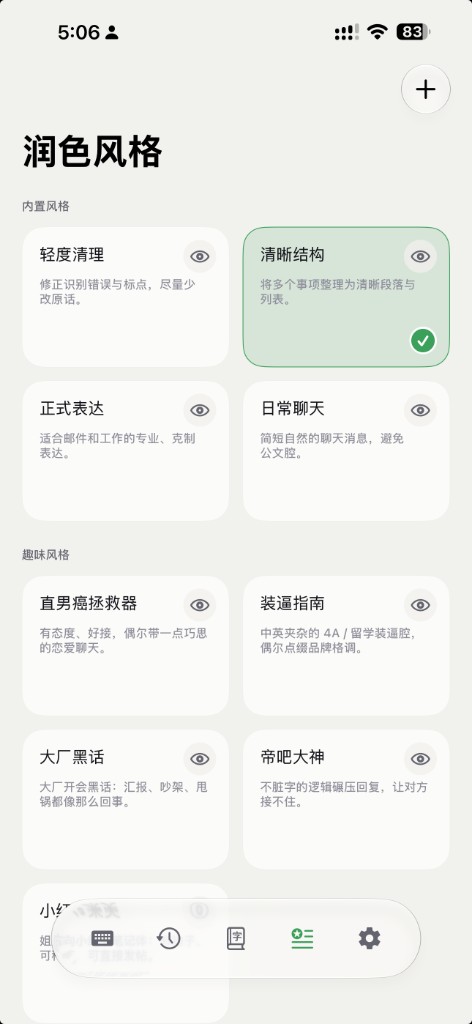
  • 新增「润色风格包」:内置轻度清理、清晰结构、正式表达、日常聊天,并支持 iCloud 同步
  • 新增「趣味润色风格」:直男癌拯救器、装逼指南、大厂黑话、帝吧大神、小红书集美五种润色风格
  • 新增自定义润色风格功能
  • 新增「画中画」保活,并作为默认风格,支持在设置中切换回灵动岛;关掉画中画即可结束会话
  • 云端识别支持真流式(百炼 / 火山 / OpenAI),说话时文字会实时上屏
  • 新增历史记录可按天删除(只清当天)
  • 设置里对流式 ASR 供应商显示「流式识别」标签;OpenAI 云端识别默认走流式

体验改进

  • 设置页重新设计,结构更清晰
  • 灵动岛保活默认改为 5 分钟(更省隐私与电量),支持多种时长设置
  • 更新 iPhone 历史、词库 Tab 图标,与 Mac / iPad 统一
  • 润色风格卡片与设置摘要更简洁,少装饰、少冗余状态字
  • 设置、风格等相关页面统一卡片留白与圆角
  • 更新权限与隐私说明

问题修复

  • 完成新手引导后不再卡在最后一页
  • 删除重装后会重新出现欢迎引导
  • 松手后尾音更不容易丢字;识别过短时会整句再识别一次兜底
  • 按下录音时麦克风预热阶段的开头语音更不易被丢掉
  • 末段识别为空时,不再把前面已经识别好的字抹掉
  • 修复趣味润色在短句时的失真问题

New Features

  • Polish style packs: Light Cleanup, Clear Structure, Formal, and Casual Chat, with iCloud sync
  • Fun polish styles: Straight-Talk Rescue, Flex Guide, Big-Tech Buzzwords, Tieba Legend, and Xiaohongshu Vibes
  • Custom polish styles
  • Picture-in-Picture keep-alive as the default, with Dynamic Island as an option in Settings; ending PiP ends the session
  • True streaming cloud ASR (Bailian / Volcengine / OpenAI) with live on-screen text while you speak
  • Delete history by day (clear only that day)
  • Settings shows a “Streaming ASR” badge for streaming providers; OpenAI cloud ASR defaults to streaming

Improvements

  • Redesigned Settings with a clearer structure
  • Dynamic Island keep-alive defaults to 5 minutes (more privacy- and battery-friendly), with multiple duration options
  • Updated iPhone History and Dictionary tab icons to match Mac / iPad
  • Simpler polish-style cards and Settings summaries — less decoration and fewer status words
  • Consistent card padding and corner radius across Settings and style pages
  • Updated permission and privacy copy

Fixes

  • Onboarding no longer sticks on the last page after completion
  • Welcome onboarding shows again after delete-and-reinstall
  • Less end-of-utterance truncation on release; very short captures retry the whole phrase
  • Speech at the start of mic warm-up is less likely to be dropped
  • An empty final segment no longer wipes earlier recognized text
  • Fixed fun-polish distortion on short sentences